

ON1 Effects 2025 Free
Own it outright - no subscription.
Add The Perfect Finishing Touch To Your Photos—It's Easy!
Give your images instant style, personality, and impact with ON1 Effects 2025—the fastest way to apply professional photo effects with creative control. Choose from hundreds of presets, filters, LUTs, textures, and borders, stack and blend them freely, and get beautiful results in just a few clicks—no layers or complex workflows required. Use ON1 Effects as a standalone app, a plugin for Photoshop and Lightroom, or fully integrated inside ON1 Photo RAW 2026.
 New Masking Tools
 Faster Performance
 New Color Tools
 New Generative AI Tools
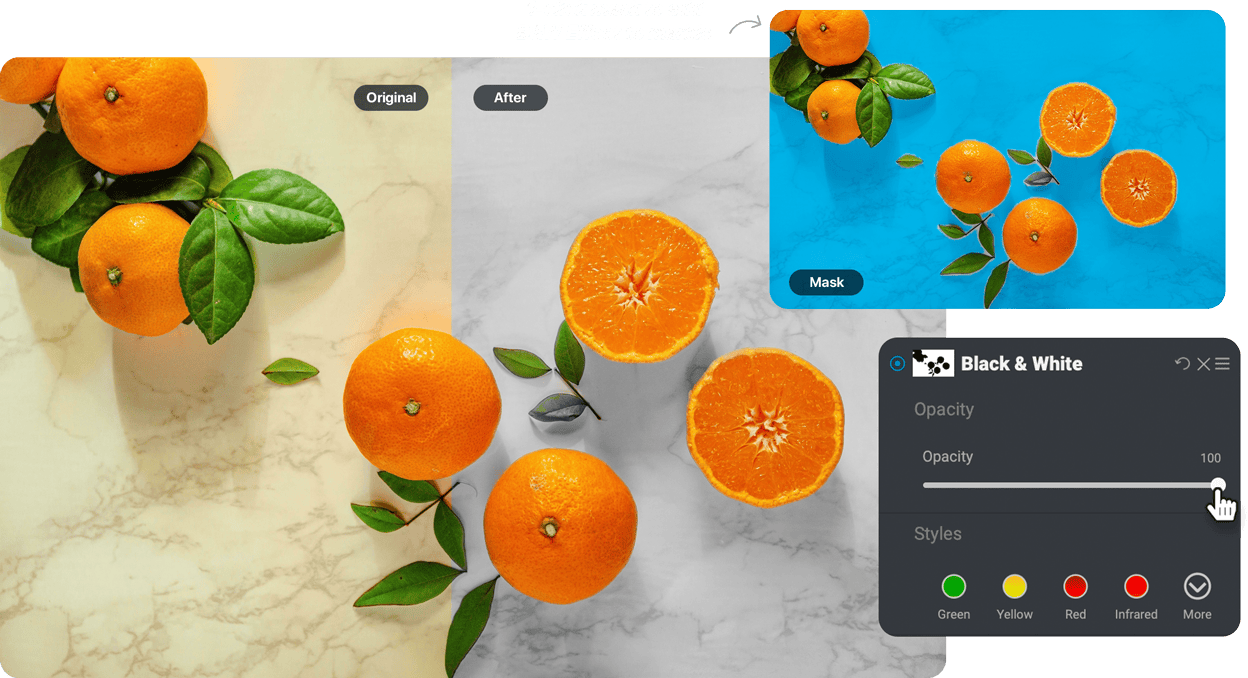

Instantly style any photo with 30+ flexible filters

AI-Powered recommendations with AI Style Advisor

Create any look with fully customizable effects

Seamlessly integrates as a plugin for Lightroom, Photoshop, and more
Get ON1 Effects 2025 for FREE*
Now is your chance to get the best photo effects software for Mac or Windows absolutely free! Claim your copy of ON1 Effects 2025 and own the software outright - no subscription required.

ON1 Effects 2025
Use as a standalone app on 2 computers
Use as a plugin for Adobe Ps/Lr
Own it outright - no subscription
Free world-class support + 100s of free editing videos
Frequently Asked Questions & System Requirements
Is ON1 Effects 2025 a standalone application or a plugin?
Both! ON1 Effects 2025 can be used as a standalone application on Mac/Windows or as a plugin for Photoshop, Lightroom Classic, Capture One, Affinity Photo, Apple Photos, and Corel PaintShop Pro.
Is ON1 Effects included inside Photo RAW and Photo RAW MAX?
Yes! The newest version of ON1 Effects is version 2026, and it is built into Photo RAW 2026. It includes powerful new filters and masking tools that are not included in Effects 2025.
What are the system requirements for Effects 2025?
| Operating System | macOS 12 and above Windows 10 version 22H2 or later, Windows 11 (current maintenance releases, 64 bit only) |
|
| Processor | Four-Core Intel or AMD processor with 64-bit support; 2 GHz or faster processor with SSE 4.2 or better or Apple Silicon ARM processors are not supported |
|
| RAM | 8 GB (16 GB if shared with the GPU) | |
| Hard Drive | 1.5 GB for installation | |
| Graphics | Windows - DirectX 12, DirectML, Vulkan 1.1, and OpenGL 4.2 compatible video card with 4GB VRAM, 1920x1080 resolution (at 100% scale factor) macOS - Metal, Vulkan 1.1, and OpenGL 4.2 compatible video card with 4GB VRAM, 1920x1080 resolution (at 100% scale factor) |
|
| Optional Integration | Photoshop CC, Photoshop Elements, Photoshop Lightroom Classic, Apple Photos, Affinity Photo, Capture One (current versions for all) | |
| Internet | A high-speed internet connection and active account for installation, ON1 Cloud Sync, activation, auto-update checking, content downloads, and tutorials. | |
| Supported Options | Supports pressure-sensitive tablets for controlling brush size and/or opacity Supports ICC/ICM/DCP profiles for camera input, display, soft-proofing, and printing. Hardware display calibration tool is recommended |
|
| Supported Languages | English, German, Spanish, French, Japanese, Korean, Simplified Chinese, Russian, Portuguese, Italian, Dutch | |